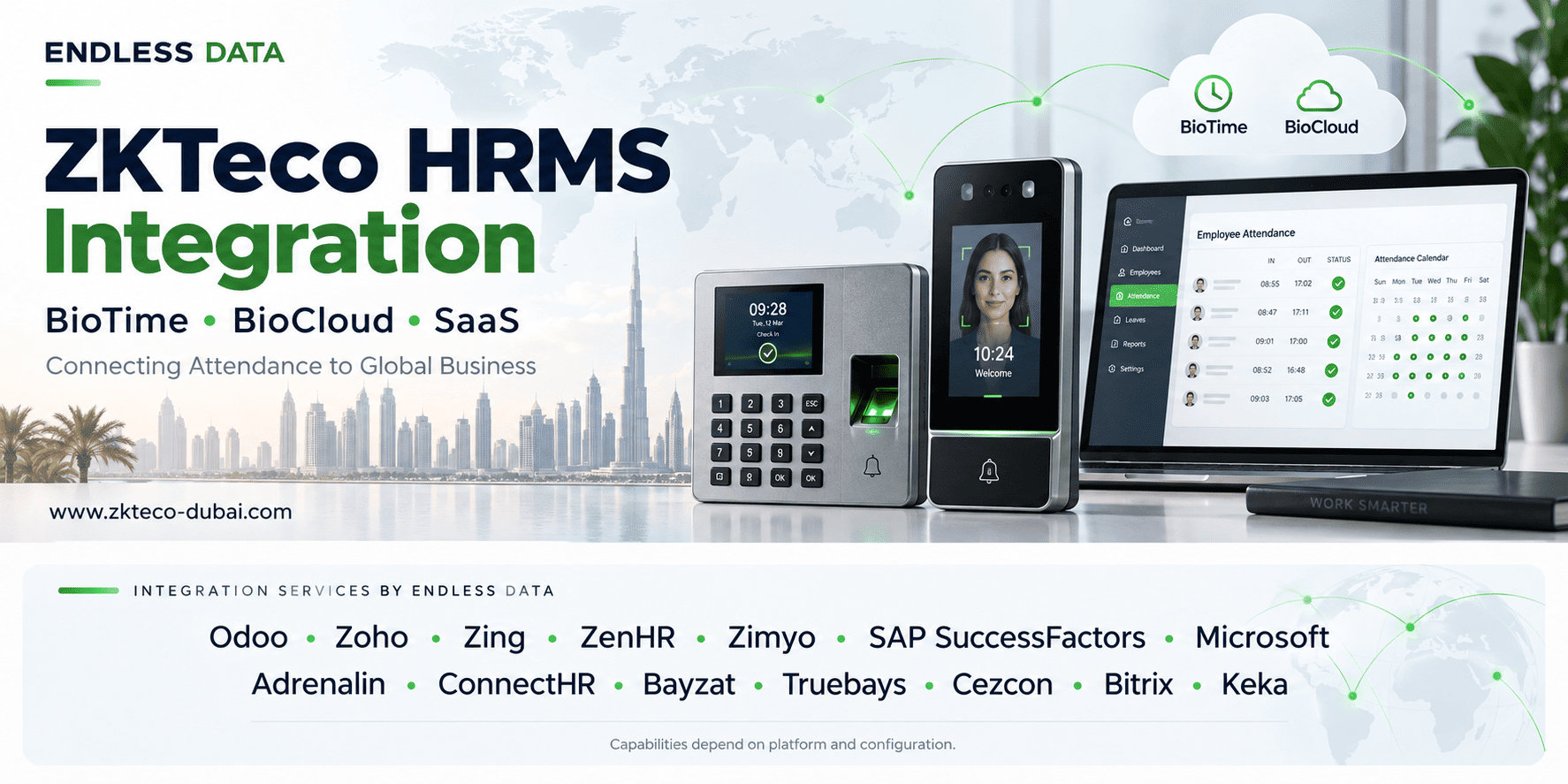
What is ZKTeco HRMS integration?
ZKTeco HRMS integration connects biometric attendance records with a human resources management system. It transfers agreed employee identifiers and attendance information so HR teams can process working hours, exceptions and payroll inputs with less manual data entry.
In a typical deployment, devices send punches to an attendance platform, an integration service validates the records, and the HRMS receives them through an approved interface. Employee synchronization can also run in the opposite direction where both systems support it.
HRMS and business systems we integrate with ZKTeco
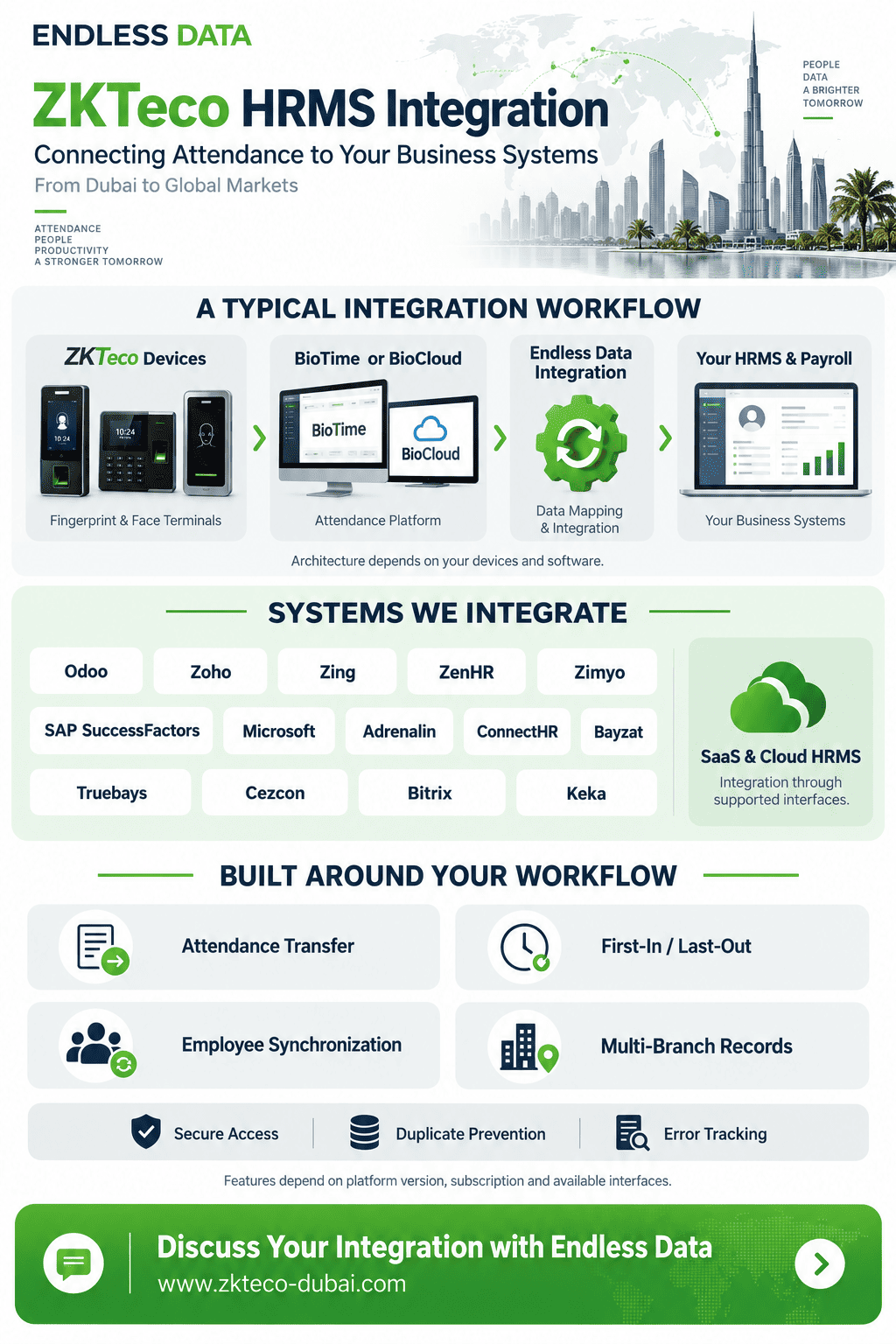
Endless Data provides integration services connecting ZKTeco attendance devices with Odoo, Zoho, Zing, ZenHR, Zimyo, SAP SuccessFactors, Microsoft, Adrenalin, ConnectHR, Bayzat, Truebays, Cezcon, Bitrix, Keka. We help organizations bring device attendance into their existing HR and business software through a project-specific integration.
Our work covers the connection between the attendance source and the receiving system: understanding requirements, mapping employee identifiers, preparing the required attendance format, configuring the transfer and verifying the results with your team.
| Business system | Integration service |
|---|---|
| Odoo | ZKTeco attendance integration with Odoo through Endless Data. |
| Zoho | ZKTeco attendance integration with Zoho through Endless Data. |
| Zing | ZKTeco attendance integration with Zing through Endless Data. |
| ZenHR | ZKTeco attendance integration with ZenHR through Endless Data. |
| Zimyo | ZKTeco attendance integration with Zimyo through Endless Data. |
| SAP SuccessFactors | ZKTeco attendance integration with SAP SuccessFactors through Endless Data. |
| Microsoft | ZKTeco attendance integration with Microsoft; the exact Microsoft product and module are confirmed during assessment. |
| Adrenalin | ZKTeco attendance integration with Adrenalin through Endless Data. |
| ConnectHR | ZKTeco attendance integration with ConnectHR through Endless Data. |
| Bayzat | ZKTeco attendance integration with Bayzat through Endless Data. |
| Truebays | ZKTeco attendance integration with Truebays through Endless Data. |
| Cezcon | ZKTeco attendance integration with Cezcon through Endless Data. |
| Bitrix | ZKTeco attendance integration with Bitrix through Endless Data. |
| Keka | ZKTeco attendance integration with Keka through Endless Data. |
ZKTeco integration with SaaS and cloud-based HRMS
Endless Data also provides integration services connecting ZKTeco attendance devices with SaaS (Software as a Service) HRMS and payroll platforms. Attendance can be collected through a compatible platform or integration service and transferred to the cloud system through its supported interface.
For each SaaS deployment, we confirm API availability, subscription permissions, authentication, company or tenant mapping, transfer limits and required attendance fields. Synchronization can be scheduled or near-real-time where the complete system supports it.
Can existing ZKTeco devices connect to a SaaS HRMS?
Yes, where a compatible collection method and a supported HRMS interface are available. Endless Data assesses the devices, attendance software and SaaS subscription before defining the connector and synchronization workflow.
What can your integration include?
- Attendance transfer: send raw punches or agreed attendance summaries to your chosen system.
- First-in and last-out: consolidate records where required, using the approved shift and attendance-day rules.
- Employee synchronization: exchange supported employee fields where the interfaces and project scope permit.
- Multiple devices and branches: retain device, location and company references when combining attendance.
- Delivery monitoring: track accepted records, rejected records and retries for reconciliation.
Tell us which system you use and what your HR team needs to receive. Request a ZKTeco integration assessment from Endless Data.
Why connect attendance with HR and payroll?
Less manual processing
Reduce repeated spreadsheet exports, column changes and uploads between attendance and payroll teams.
More consistent records
Map employee IDs and validate transactions before they reach the receiving system.
Visibility across branches
Consolidate records from different locations while retaining device and branch identifiers.
Easier reconciliation
Trace which records were accepted, rejected or left pending so HR can resolve exceptions.
These benefits depend on correct configuration and operational ownership. Integration supports payroll accuracy; it does not replace attendance policies, approvals or review of missing punches.
How ZKTeco connects with your HRMS
- Capture
A compatible device records an employee attendance event.
- Collect
The attendance platform stores transactions from connected devices.
- Validate
Middleware maps IDs, checks timestamps and prepares the destination format.
- Transfer
The HRMS accepts records through its supported interface.
- Reconcile
HR checks attendance results before payroll processing.
ZKTeco describes ZKBio Time as a web-based attendance platform for compatible push devices and also publishes a ZKBio Time API product page. Exact endpoint availability and licensing depend on the installed version.
ZKTeco integration through BioTime and BioCloud
Endless Data provides HRMS integration services through BioTime or BioCloud, depending on the customer's attendance environment. These platforms can act as the collection layer between compatible ZKTeco devices and the integration service that transfers records to the receiving HRMS.
A typical workflow is: ZKTeco devices → BioTime or BioCloud → Endless Data integration service → HRMS or payroll. This is one integration approach; a different approved collection method may be appropriate for some deployments.
Connect your BioTime installation
For organizations using BioTime, Endless Data assesses the installed version and available interfaces, maps employees and attendance fields, and configures the agreed transfer to the target system. The project can retain the existing attendance platform where it meets the requirements.
Explore BioTime and other ZKTeco software →Connect your BioCloud environment
For organizations using BioCloud, Endless Data defines how attendance records will be exchanged with the customer's HRMS or payroll software. The available interface, account permissions and required business rules determine the scope.
Explore BioCloud for ZK →What we agree before connecting the systems
- Whether the destination needs raw attendance punches or calculated first-in and last-out records.
- Which system maintains employee master data and calculates shifts, overtime and absence.
- How employees, departments, companies and device locations map between platforms.
- How accepted transactions, rejected records and late corrections are reconciled.
BioTime and BioCloud are separate products. Their interfaces, permissions and deployment arrangements should be checked independently; a connector designed for one must not be assumed to work unchanged with the other.
Choosing the right integration method
| Method | Suitable when | Confirm before development |
|---|---|---|
| REST API | The systems expose documented web interfaces. | Authentication, fields, pagination, rate limits and per-record responses. |
| Database interface | A controlled on-premises deployment offers an approved data interface. | Read-only access, supported views and upgrade compatibility. |
| CSV or file import | HR or payroll uses scheduled imports. | Column order, encoding, date format and import acknowledgements. |
| SDK or device protocol | A supported device needs a custom connector. | Model, firmware, SDK terms, network design and recovery behaviour. |
REST API integration
Use HTTPS and the authentication method documented by each vendor. Track the result for each transaction; a successful HTTP response alone may not mean every record in the request was accepted.
Database integration
Prefer vendor-approved views, stored procedures or integration tables. Avoid writing directly into application tables unless the vendor explicitly supports that operation.
File-based integration
Agree a file naming convention and delivery schedule. Keep a manifest of exported records and confirm whether the destination imported the file successfully before marking the transfer complete.
Device-level integration
Direct integration needs device-specific compatibility testing. A fingerprint reader, a face terminal and a portable device do not necessarily expose the same communication features.
Which data should be synchronized?
The minimum useful attendance payload normally identifies the employee, the event time and its source. Additional fields depend on the receiving system. Preserve the original event separately from any calculated attendance result.
| Data group | Typical fields | Design rule |
|---|---|---|
| Employee | Employee number, department, branch, active status | Choose a stable unique identifier and a system of record. |
| Raw attendance | Transaction ID, timestamp, device, punch state | Retain source values and document code meanings. |
| Calculated attendance | First-in, last-out, worked time, lateness, approved overtime | Transfer only results required by the HRMS. |
| Delivery tracking | Status, attempt time, response reference, rejection reason | Make retries and reconciliation traceable. |
An HRMS employee number may differ from a device enrolment number. Maintain an explicit mapping instead of matching people by name. For multiple companies, include company context so the same employee number cannot be assigned to the wrong entity.
First-in, last-out and overnight shifts
First-in and last-out exports can be useful when the HRMS needs a daily summary. However, reducing every calendar day to two punches is unsuitable for some shift patterns.
A shift crossing midnight
An employee starts at 20:00 on Monday and leaves at 05:00 on Tuesday. Both events may belong to Monday’s scheduled shift. Grouping by calendar date would split the shift into two incomplete days.
- Define attendance-day boundaries using the agreed shift schedule.
- Decide how breaks, split shifts, missing punches and approved corrections are processed.
- Keep a shift provisional until its closing window has passed.
- Use an approved update or reprocessing mechanism for late-arriving transactions.
- Do not treat elapsed time between first and last punches as payable hours without applying the agreed rules.
Security and reliability requirements
Prevent duplicates
Use a source transaction identifier where available, or a carefully designed key containing the source, employee and event details. A retry must not create another attendance entry.
Retain and retry failures
Keep pending transactions until acceptance is confirmed. Retry temporary connection errors with a controlled delay; route invalid employee IDs and other permanent rejections for correction.
Control access
Use HTTPS, least-privilege service accounts and securely stored credentials. Limit access to attendance data and avoid exposing database servers or device administration interfaces publicly.
Manage time consistently
Document the time zone of each device and server, preserve event time, and handle daylight-saving changes where relevant. A server hosted abroad must not silently shift an employee’s attendance time.
Minimize biometric data transfer
Most HRMS integrations require attendance events, not fingerprint or face templates. Agree access permissions, retention and responsibilities with the organization before implementation.
Common problems and practical checks
- Attendance was sent but is missing in HRMS.
- Inspect the per-record response, employee mapping and receiving attendance screen. Check whether the endpoint queues records for later processing.
- A whole batch failed.
- Check batch validation rules. Isolate rejected records and retry only unaccepted items when the API supports this.
- One employee has duplicate punches.
- Inspect checkpoints and duplicate protection. Preserve the original source ID across retries.
- The last check-out is wrong.
- Review overnight shifts, closing windows, late-arriving events and the event time zone.
- A branch has stopped synchronizing.
- Check device connectivity, collector health, credentials and the oldest pending transaction before restarting services.
Implementation: from assessment to go-live
- Assess the environment. List device models, firmware, attendance platform version, HRMS, locations and expected transaction volume.
- Agree the data contract. Document field mappings, company IDs, time zones, status codes and the owner of attendance calculations.
- Build a limited pilot. Test with a small employee group and representative devices before wider rollout.
- Test exceptions. Include overnight shifts, missing IDs, network outages, duplicates, rejected records and late corrections.
- Reconcile end to end. Compare source transactions with destination attendance results, not just the number of API calls.
- Launch with ownership. Assign monitoring, escalation and reconciliation responsibilities; document recovery and future version changes.
Sourcing from Dubai for international projects
This guide is for businesses, resellers and system integrators sourcing solutions from Dubai for projects in the Middle East, Africa, Asia, Europe and other international markets.
Successful procurement includes more than device quantities. Confirm the deployment country, network environment, software licensing, language requirements and the responsibilities of the HRMS vendor, integration team and local installer.
Explore ZKTeco biometric devices and attendance software options, then request a compatibility review for your intended architecture. Supply availability and support arrangements should be confirmed for the specific destination and project.
Frequently asked questions
Can Endless Data integrate HRMS through BioTime or BioCloud?
Yes. Endless Data provides integration services through BioTime or BioCloud where the installed platform and receiving HRMS offer suitable interfaces. We agree the required attendance data, employee mapping, shift rules and synchronization schedule for each deployment.
Are BioTime, BioCloud and SaaS the same thing?
No. BioTime and BioCloud are separate attendance platforms. SaaS means Software as a Service: a delivery model used by cloud-hosted applications, including many HRMS platforms. The integration architecture depends on the actual products and deployment.
Which systems does Endless Data integrate with ZKTeco devices?
Endless Data provides ZKTeco attendance integration services for Odoo, Zoho, Zing, ZenHR, Zimyo, SAP SuccessFactors, Microsoft, Adrenalin, ConnectHR, Bayzat, Truebays, Cezcon, Bitrix, Keka. We confirm the exact product, version, enabled interfaces and required workflow before defining the integration scope.
Do all listed systems support the same integration features?
No. Raw attendance transfer, first-in and last-out summaries, employee synchronization and delivery frequency are agreed separately for each deployment. The receiving system’s supported interfaces and account permissions determine what can be enabled.
Can Endless Data integrate devices that are already installed?
We can assess your existing installation for an integration project. Share the device models, firmware, attendance software and target HRMS so we can confirm the appropriate connection method and any changes required.
Can ZKTeco integrate with any HRMS?
Compatibility depends on the device, firmware, attendance software and HRMS interface. An API, approved database interface or supported file import can enable integration, but the exact versions and licensing must be checked before implementation.
Can BioTime or BioCloud connect to our payroll system?
An integration may be possible when the installed attendance platform and payroll system expose suitable interfaces. Confirm the available fields, authentication, licensing and import rules for your specific deployment. BioTime and BioCloud are separate platforms; do not assume their APIs are interchangeable.
Can we send only the first check-in and last check-out?
Yes, middleware can consolidate punches according to agreed shift rules. Overnight shifts must be assigned to a working day correctly, and a single punch must be flagged rather than treated as a complete shift.
Will synchronization happen in real time?
Near-real-time or scheduled synchronization can be designed when the devices, software and receiving API support it. Actual latency depends on connectivity, polling intervals, API limits and processing rules.
Can employee records flow from HRMS to the attendance system?
Yes, where supported interfaces allow it. Define the HRMS as the source of employee information, map employee identifiers, and agree how changes, transfers and leavers are handled.
Does HRMS need fingerprint or face templates?
Usually it only needs employee identifiers and attendance events. Biometric templates should remain within the authorized biometric system unless a separate, explicitly approved requirement exists.
What happens if the HRMS API is unavailable?
A resilient integration retains unsent records and retries temporary failures. Idempotency or duplicate detection prevents repeated submissions from creating duplicate attendance entries.
Can we source devices from Dubai for an overseas project?
Contact ZKTeco Dubai with your destination country, device quantities, HRMS name and deployment requirements. Device suitability, supply arrangements, remote support and any local installation responsibilities should be confirmed for the project.
Does an API success response mean payroll has been updated?
Not necessarily. A response may confirm receipt or acceptance only. Reconcile the accepted transactions with the HRMS attendance screen and subsequent payroll processing before considering the workflow complete.
ZKTeco: ZKBio Time · ZKTeco: ZKBio Time API. Product documentation establishes platform capabilities; architecture and operating practices in this guide are project-design recommendations.